> For the complete documentation index, see [llms.txt](https://codedthemes.gitbook.io/mantis/llms.txt). Markdown versions of documentation pages are available by appending `.md` to page URLs; this page is available as [Markdown](https://codedthemes.gitbook.io/mantis/v3.2.0/quick-start.md).
# Quick Start
Quick start your project using Mantis.
### Installation
Navigate to your root folder **`(i.e. mantis-material-react)`**
```
c:\>cd mantis-material-react
```
Install Packages by **npm** or **yarn** as per your preferences. Here we are using **`yarn`** package manager.
```bash
c:\mantis-material-react> yarn
```
{% hint style="warning" %}
If you are using npm, please use **npm i**
{% endhint %}
{% hint style="info" %}
**We would recommend yarn over npm**. Why? see this:
{% endhint %}
### Start
After package installation, you can start your app by using **`yarn start`** command
```bash
c:\mantis-material-react> yarn start
```
For nextJS use **`yarn dev`** command
```bash
c:\mantis-material-react> yarn dev
```
This will start your local server at **`http://localhost:3000`** Also, your terminal shows the following.
```javascript
Compiled successfully!
You can now view mantis-material-react in the browser.
Local: http://localhost:3000
On Your Network: http://192.168.29.77:3000
Note that the development build is not optimized.
To create a production build, use yarn build.
```
### Build & Deploy
This might be too early to deploy but it is always good to know how to deploy.
To build your app in production use **`yarn build`** command
```javascript
c:\mantis-material-react> yarn build
or
c:\mantis-material-react> npm run build
```
## Troubleshooting
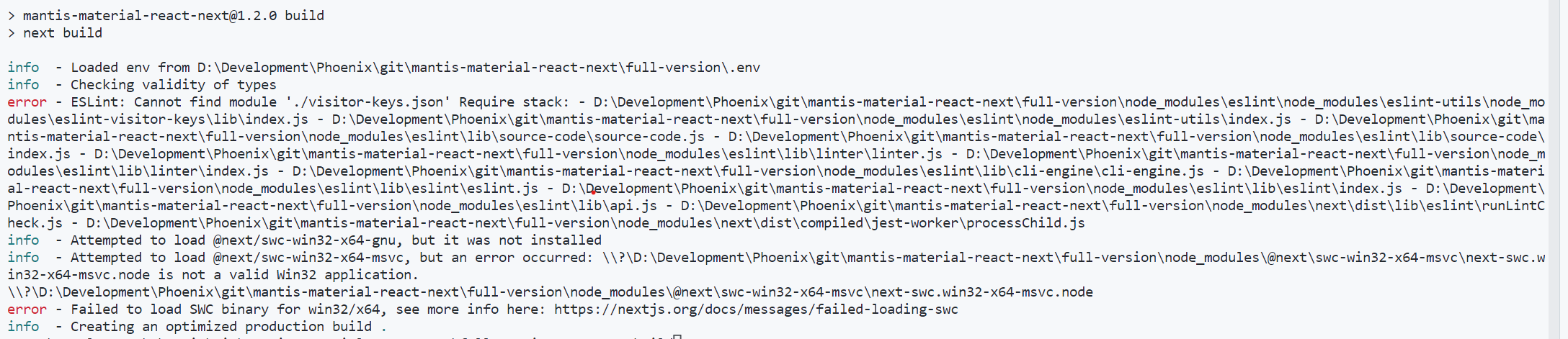
1. An issue in the next JS production build
next js build issue
**Cause:**
**Solution:** Install the missing software from here:
{% hint style="info" %}
**You’ll need to have Node v12.x.x or later on your local development machine** (but it’s not required on the server). You can use [nvm](https://github.com/creationix/nvm#installation) (macOS/Linux) or [nvm-windows](https://github.com/coreybutler/nvm-windows#node-version-manager-nvm-for-windows) to easily switch Node versions between different projects.
{% endhint %}